Vibe Browser for
Give Hermes control of your browser
One block in ~/.hermes/config.yaml. Paste your Vibe URL under mcp_servers, restart, done.
These steps follow the public Hermes MCP config pattern: remote servers are mcp_servers entries with a url in ~/.hermes/config.yaml, checked with hermes mcp test. We have not live-tested this exact pairing yet, so treat it as a guide.
Setup steps
1Install the Vibe extension in Chrome
Add Vibe AI Browser from the Chrome Web Store (Chrome, Brave, Edge, or any Chromium browser). This is the piece that lets an agent drive the browser you are already logged into — no second browser profile, no re-authentication.
2Copy your agent connection URL from the extension
Click the Vibe icon → Settings → turn on "Enable external AI agent control" → choose Remote (internet) → copy the Agent connection URL. The last path segment is your routing UUID. The connector URL is https://relay.api.vibebrowser.app/mcp/ followed by that UUID. Leave the extension running and remote control on — the connector talks to this browser, so if it is closed there is nothing on the other end.
Vibe extension → Settings → Agent connection URLurlhttps://relay.api.vibebrowser.app/mcp/<your-routing-uuid>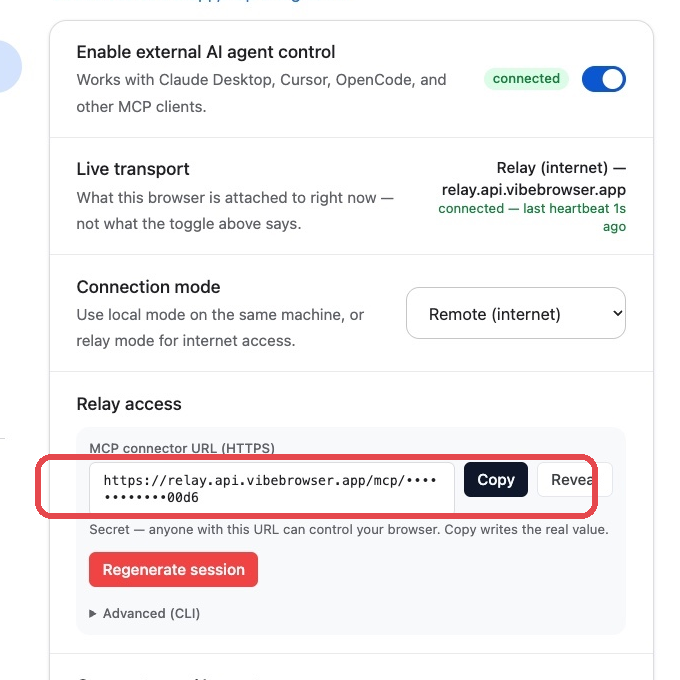
3Add Vibe to ~/.hermes/config.yaml and restart
Open ~/.hermes/config.yaml and add the block below (keep your other servers — just add this one). Then restart Hermes, or type /reload-mcp in the chat. Test it with: hermes mcp test vibe
~/.hermes/config.yamlbashmcp_servers: vibe: url: "https://relay.api.vibebrowser.app/mcp/<your-routing-uuid>"
Your relay URL / extension UUID grants live control of your browser session. Treat it like a password: never commit it or paste it into a shared chat.
Check it works
List the tabs I have open in my browser right now.Expected answer: your real open Chrome tabs
Ask Hermes in chat after the restart — or run "hermes mcp test vibe" in a terminal to see the Vibe tool list. Hermes cannot know your tabs on its own, so a correct list proves the connector works.
Quick answers
- Where does the config go?
- In ~/.hermes/config.yaml, inside the mcp_servers block. If the file already has servers, add "vibe" next to them — do not replace the block.
- How do I check the connection?
- Run "hermes mcp test vibe" in a terminal. It connects to the server and lists the tools it found. In chat, /reload-mcp refreshes the tools without a restart.
- Do I need to install a local MCP server?
- No. Vibe is a remote MCP server — Hermes connects to the URL directly. The only thing you install is the Vibe Chrome extension.