Vibe Browser for
Connect Dots to your browser
There is no separate Dots setup. Dots use your ChatGPT apps — connect Vibe in ChatGPT once, and your dot can use it.
Dots launched September 29, 2026 and reuse the apps connected in ChatGPT — that is the connection path, confirmed from OpenAI's launch material and hands-on reports. The ChatGPT setup itself is checked on this site. We have not yet run a dot against Vibe end to end. Dots need ChatGPT Pro or Business Premium.
Setup steps
1Install the Vibe extension in Chrome
Add Vibe AI Browser from the Chrome Web Store (Chrome, Brave, Edge, or any Chromium browser). This is the piece that lets an agent drive the browser you are already logged into — no second browser profile, no re-authentication.
2Copy your agent connection URL from the extension
Click the Vibe icon → Settings → turn on "Enable external AI agent control" → choose Remote (internet) → copy the Agent connection URL. The last path segment is your routing UUID. The connector URL is https://relay.api.vibebrowser.app/mcp/ followed by that UUID. Leave the extension running and remote control on — the connector talks to this browser, so if it is closed there is nothing on the other end.
Vibe extension → Settings → Agent connection URLurlhttps://relay.api.vibebrowser.app/mcp/<your-routing-uuid>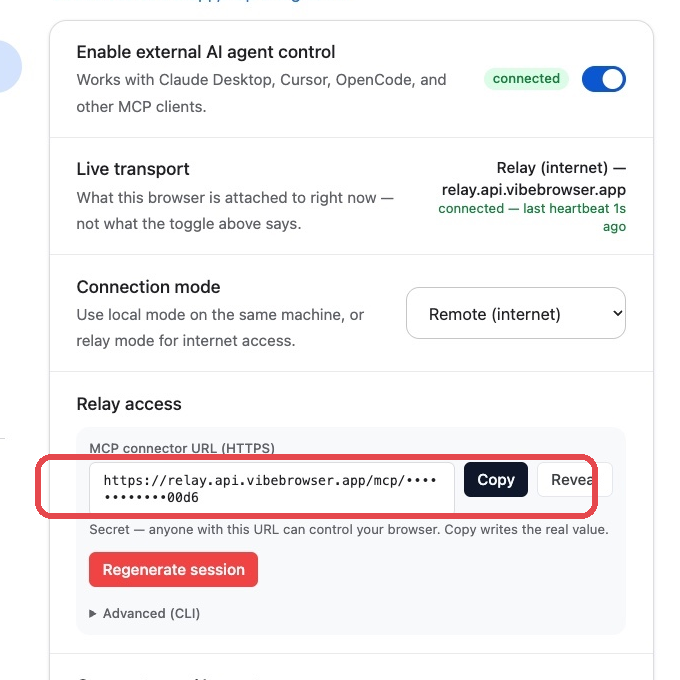
3Add Vibe in ChatGPT — this is the whole setup
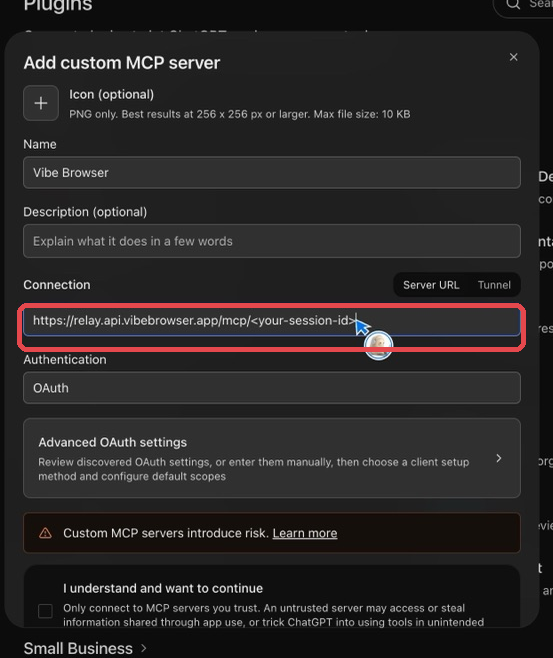
Go to chatgpt.com/plugins, click Add → Add custom MCP server. Name it "Vibe Browser", paste your connector URL, and set Authentication to No Auth. Full screenshots are in the ChatGPT guide on this site. There is nothing else to set up in Dots.
4Ask your dot to do a task
Open chatgpt.com/dots and pick your dot (or make one). Ask it to open a page or check a site for you. It uses the Vibe app you just connected, and your Chrome does the work. Keep Chrome open with the extension running.
Your relay URL / extension UUID grants live control of your browser session. Treat it like a password: never commit it or paste it into a shared chat.
Quick answers
- What is Dots?
- Dots are always-on personal agents inside ChatGPT, launched by OpenAI on September 29, 2026. Each dot has its own cloud computer and browser, keeps working between chats, and uses the apps and connectors on your ChatGPT account.
- How do I connect Vibe to Dots?
- You do not connect it in Dots — you connect it in ChatGPT. Add Vibe at chatgpt.com/plugins as a custom MCP server (one URL, Authentication: No Auth), and your dots can use it right away. The ChatGPT guide on this site has the screenshots.
- Which plan do I need for Dots?
- Dots are a ChatGPT Pro and Business Premium feature at launch. The Vibe connection itself also needs a paid ChatGPT plan — on a free account the custom MCP server form never opens.