Vibe now runs offline with Gemma 4: private and free
In 1.1.42 Vibe can run Google's Gemma 4 on your own machine through WebGPU. No account, no API key, no card — and on signed-out Auto your chats and page content stay on the device.
Every AI browser assistant asks you the same two things before it does anything useful: make an account, and send us your pages. In the 1.1.42 build of Vibe AI Browser Co-Pilot, on a WebGPU-capable computer, it asks for neither.
Available in 1.1.42. This post describes the build that is going out; if you are on an earlier version from the Chrome Web Store you will not see the on-device cards yet.
What actually changed
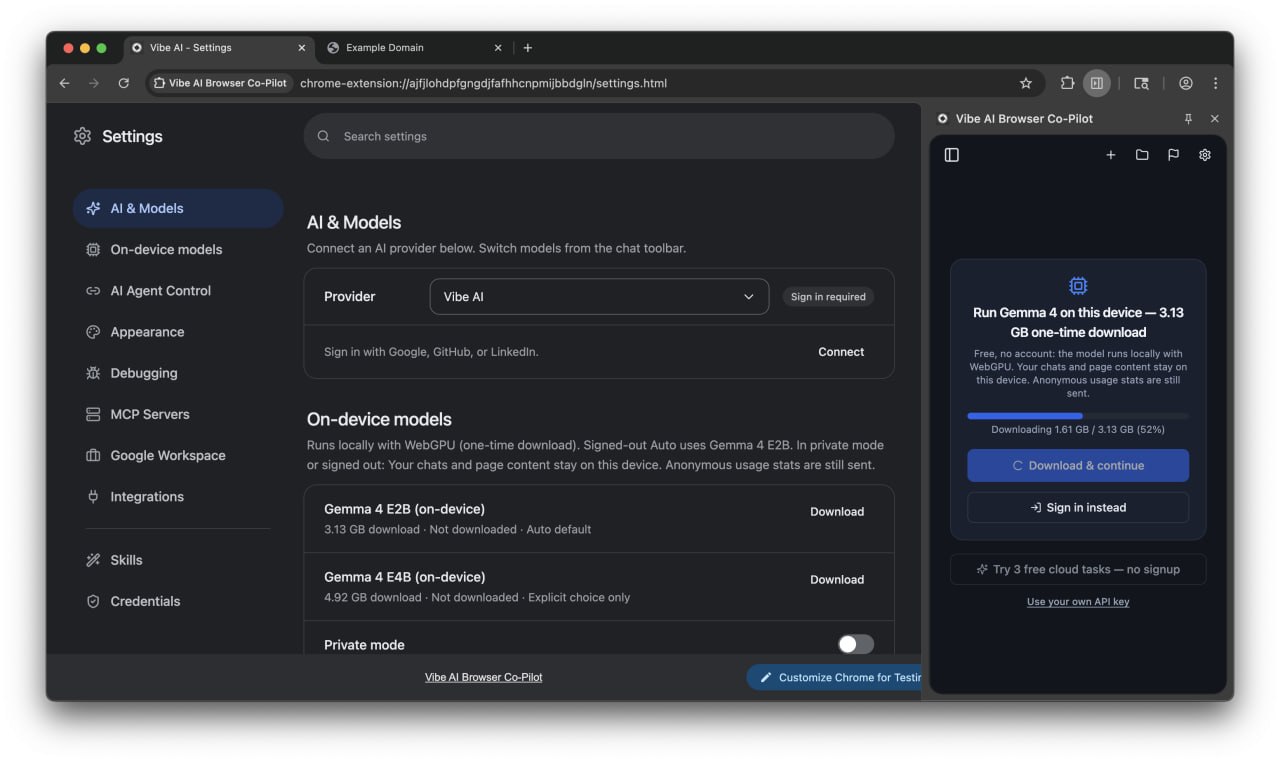
Vibe can now run Google's Gemma 4 E2B locally, in your browser, through WebGPU. Open the side panel on a fresh profile, click Download & continue, and the model downloads once — 3.13 GB — into the browser's cache. After that, the agent's model runs on your own GPU.
For a signed-out user in Auto mode on a capable device, that local model is the default. There is no fallback hop to our cloud behind your back: a fresh signed-out profile chats with zero LLM calls to api.vibebrowser.app.
Two models ship in the picker:
- Gemma 4 E2B — 3.13 GB download. This is what Auto picks.
- Gemma 4 E4B — 4.92 GB download. Bigger, and an explicit choice only; Auto never selects it for you.
Free, no account needed
No sign-up, no API key, no credit card. The one-time download is the entire cost. That matters for the two cases people keep writing to us about: trying the thing before trusting it with an account, and working on material that simply should not go to a vendor's server.
What "private" means here, precisely
We would rather be exact than loud, because privacy copy that overstates is worse than no copy at all.
In private mode or signed-out Auto: your chats and page content stay on this device. Anonymous usage stats are still sent.
That is the whole claim. It is not "Vibe never uses the cloud." If you are signed in, Vibe keeps today's cloud routing unless you turn Private mode on in Settings → On-device models. And if a local run fails while Private mode is on, Vibe does not quietly re-send it to the cloud — it shows you the error with an explicit Send via cloud button, and only your click sends that one message.
What it needs from your machine
On-device inference is not free of hardware. Vibe checks the device before offering it: WebGPU with f16 shader support and enough memory. On a computer that does not qualify, you will see a sign-in card instead, with the concrete reason, and you use a cloud model as before. We would rather tell you your laptop can't do it than let you watch a 3.13 GB download fail.
Speed is honest too: a small local model on consumer hardware is slower than a frontier cloud model, and E2B is a small model. For reading a page, summarising, and driving short browser tasks it holds up. For long multi-step agent runs, cloud still wins on latency.
Try it
Grab the extension at vibebrowser.app, open the side panel, and take the local path when it offers. If your device qualifies, you will be chatting with an AI that never phoned home about what you were reading.